The “Mexican Standoff” of Managed Solutions
In enterprise-scale Power Platform environments, we aim for a modular architecture. We split our logic into multiple solutions—perhaps one for “Finance” and another for “HR.” However, without a strict dependency strategy, you will eventually hit a Solution Deadlock.
This usually happens during a Staged Upgrade. You try to deploy an update to Solution A, but it fails because Solution B (already in Production) holds a dependency on a component that Solution A is trying to modify or remove. When you try to update Solution B first, you hit the same wall.
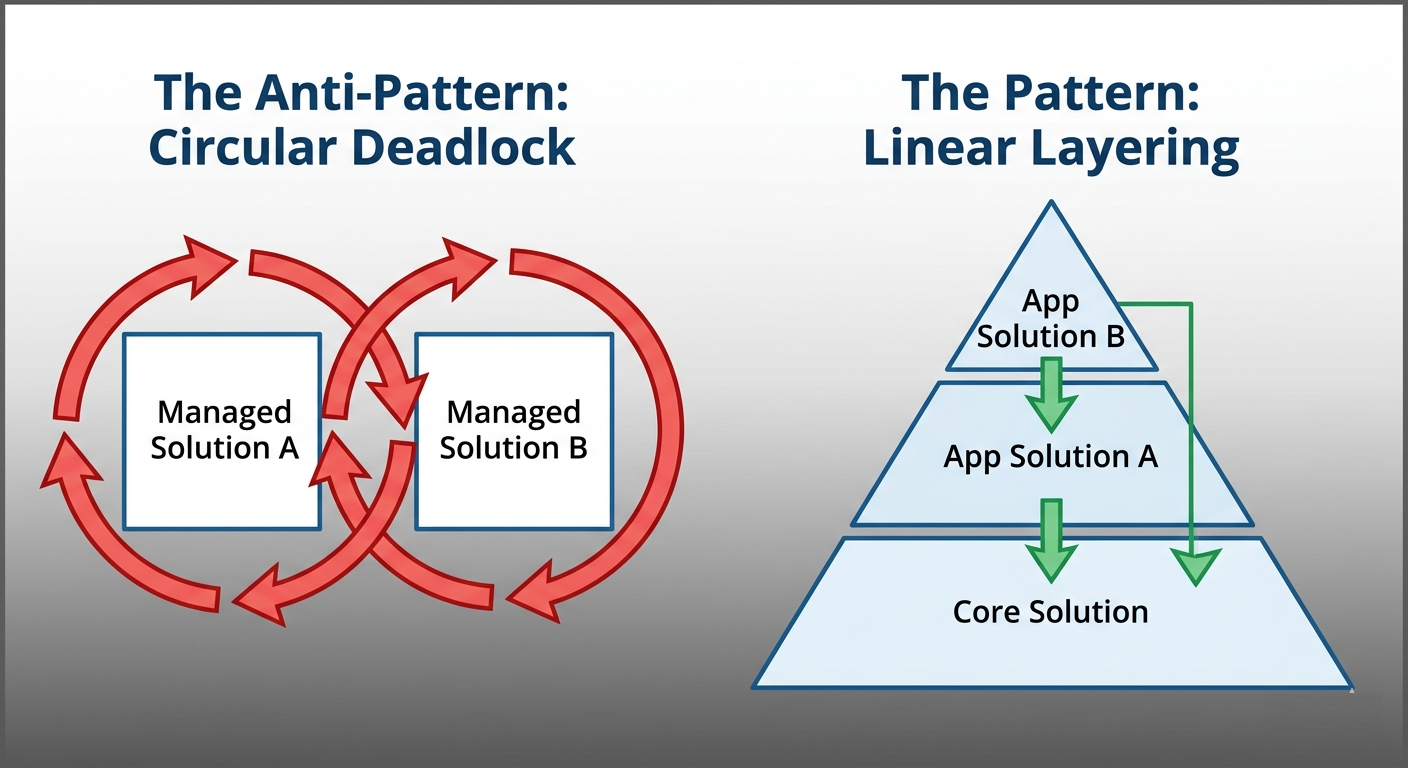 Figure 1: Visualizing the Circular Dependency Anti-Pattern vs. the Core Foundation Pattern.
Why Microsoft’s “Break-Fix” Isn’t Enough
Microsoft’s standard troubleshooting documentation focuses on “unsticking” the error manually by deleting components or using temporary patches. As a Lead Architect, your goal isn’t just to fix the error—it’s to engineer a system where this cannot happen.
The Root Cause: Ownership Ambiguity
The deadlock occurs because of Circular Layering. This is most common with Connection References and Environment Variables. If both Solution A and Solution B contain the same Connection Reference, the platform loses track of which solution is the “Source of Truth” for that component’s base layer.
The Architectural Fix: The “Core Foundation” Pattern
Instead of fighting the layering engine, we change the topology of our dependencies from a Web to a Pyramid.
1. Identify the “Shared Kernel”
Identify every component (Connection References, Custom APIs, Shared Tables) that is used by more than one functional solution.
2. Extract to a “Core” Solution
Create a new solution in your Development environment. Move all shared components into this solution.
3. Establish Linear Dependency
Update your functional solutions to reference the components in the “Core” solution rather than carrying their own copies.
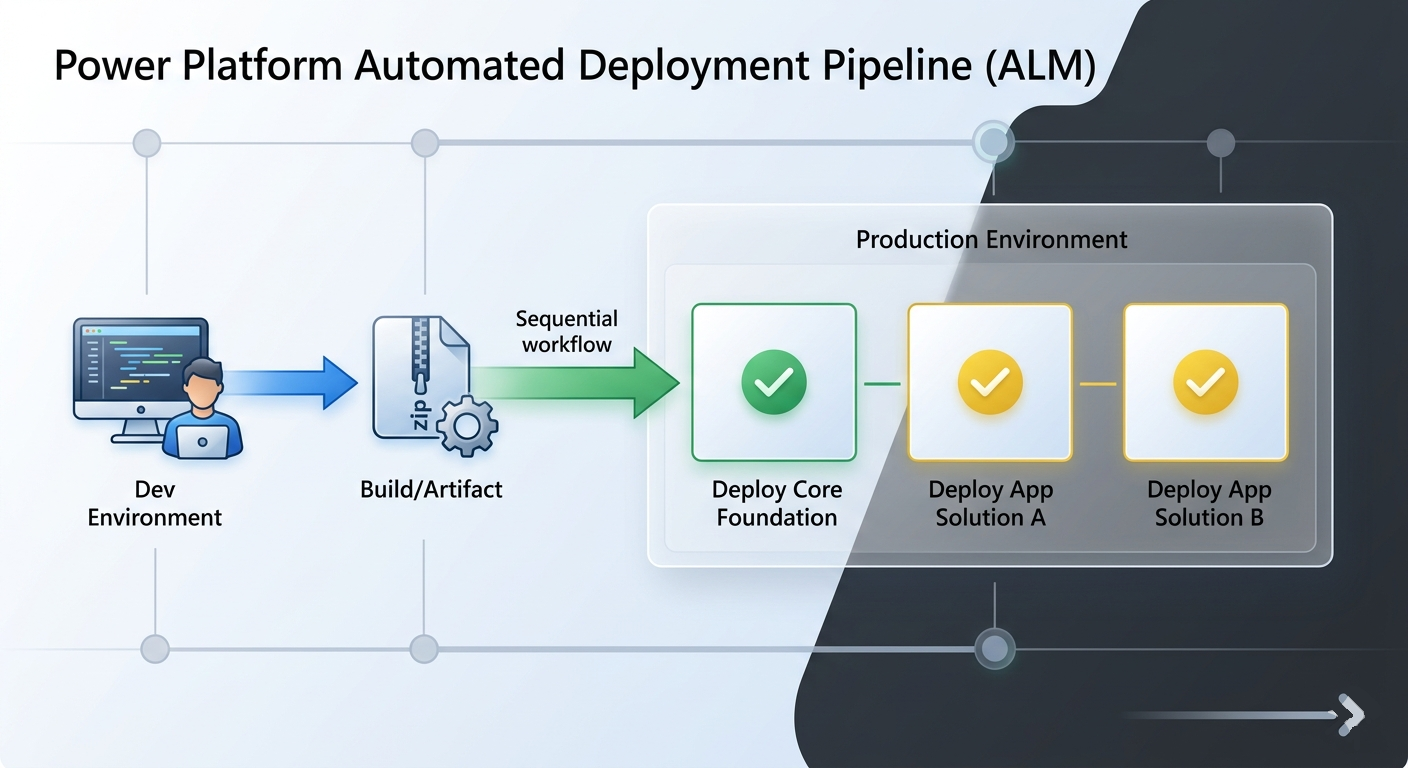 Figure 2: The correct deployment sequence: Core Foundation must be pushed before functional apps.
| Strategy | The “Quick Fix” (Manual) | The “Architectural Fix” (Strategic) |
|---|---|---|
| Effort | Low (One-time) | Medium (Requires refactoring) |
| Risk | High (May recur on next deploy) | Low (Permanent stability) |
| Pipeline Impact | Usually breaks CI/CD | Fully supports Automated ALM |
| Best For | Hotfixes/Small Environments | Enterprise/Scalable Architectures |
Step-by-Step Resolution Guide
If you are currently stuck in a deadlock in Production, follow this sequence:
- Deploy the Foundation: Manually export your new Core Managed Solution from Dev and import it into Production. This establishes the new “Base Layer” for shared components.
- Perform a ‘Solution Upgrade’: When deploying the updated Solution A and Solution B, ensure you select Stage for Upgrade and Overwrite Customizations. This forces the platform to re-evaluate the dependency tree.
- Verify the Layers: Use the “See Solution Layers” tool in the Power Apps portal. Ensure the Connection Reference now shows the Core solution as the primary managed owner.
Conclusion
In modern Software Engineering, Separation of Concerns is a fundamental law. Applying this to Power Platform solutions ensures that your deployment pipelines remain green and your environments stay healthy. Don’t just fix the error—fix the architecture.
Found this helpful? I’d appreciate it if you could share this with your team or mark this as a helpful resource in the Power Platform community!
Let’s Connect
How is your organization handling the shift to Managed Environments in 2026? I would love to hear your thoughts in the Power Platform Community or on LinkedIn.

Sunil Kumar Pashikanti
Principal Software Architect & Microsoft Community Super User. With 18+ years in the Microsoft ecosystem, I specialize in bridging the gap between enterprise business needs and advanced technical execution across Power Platform and Azure.